How to show up in AI searches: On-page fixes edition
Below are 3 quick on-page fixes you can do this week to improve how you show up in AI searches, sourced straight from the AI search platforms you wanna show up in.
Updated June 2026: FAQ rich results are officially dead, Google shipped its own AI report in Search Console, and a note on what Google actually said about "chunking."
You already know AI is changing the way people find stuff on the internet. You wanna show up in AI search results, but you don’t know how it works. And the whole thing stresses you out, making you feel like you’re being left behind.
I felt the same way.
So my team and I with Alternative Wedding DJs spent 6 months figuring it out, mostly. We’ve read guides straight from the AI platforms, watched SEO experts debate, and have experimented on our own pages.
I say “mostly” because even the experts aren’t 100% sure how effective different strategies actually are. And some people are flat out making educated guesses. It feels as though the SEO industry is falling-forward at this time.
But the good news is that Google released a paper in May of 2026 that tells us exactly what to do, specifically for Google and Gemini searches.
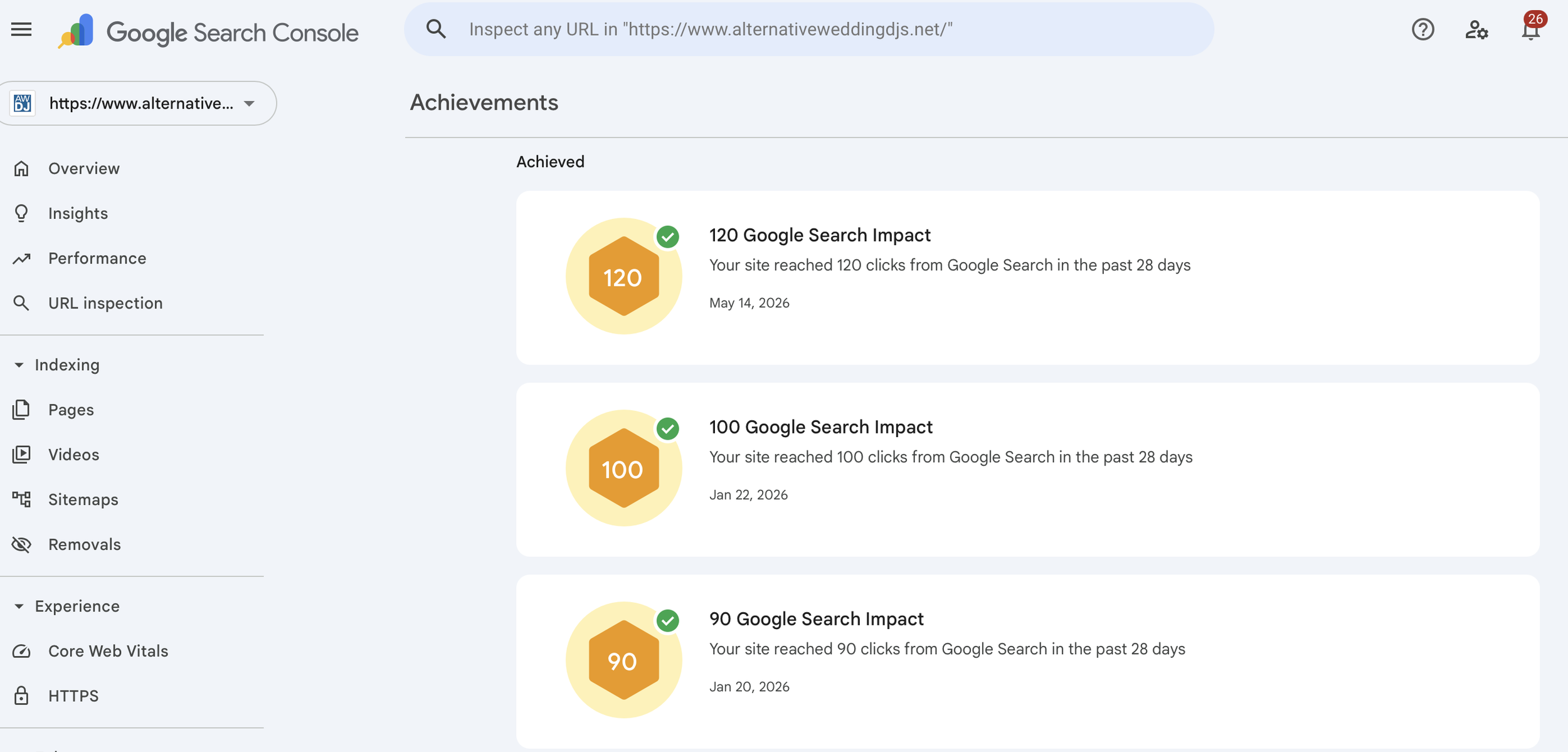
In combination with that and other efforts, we can say that we’ve noticed some positive results.
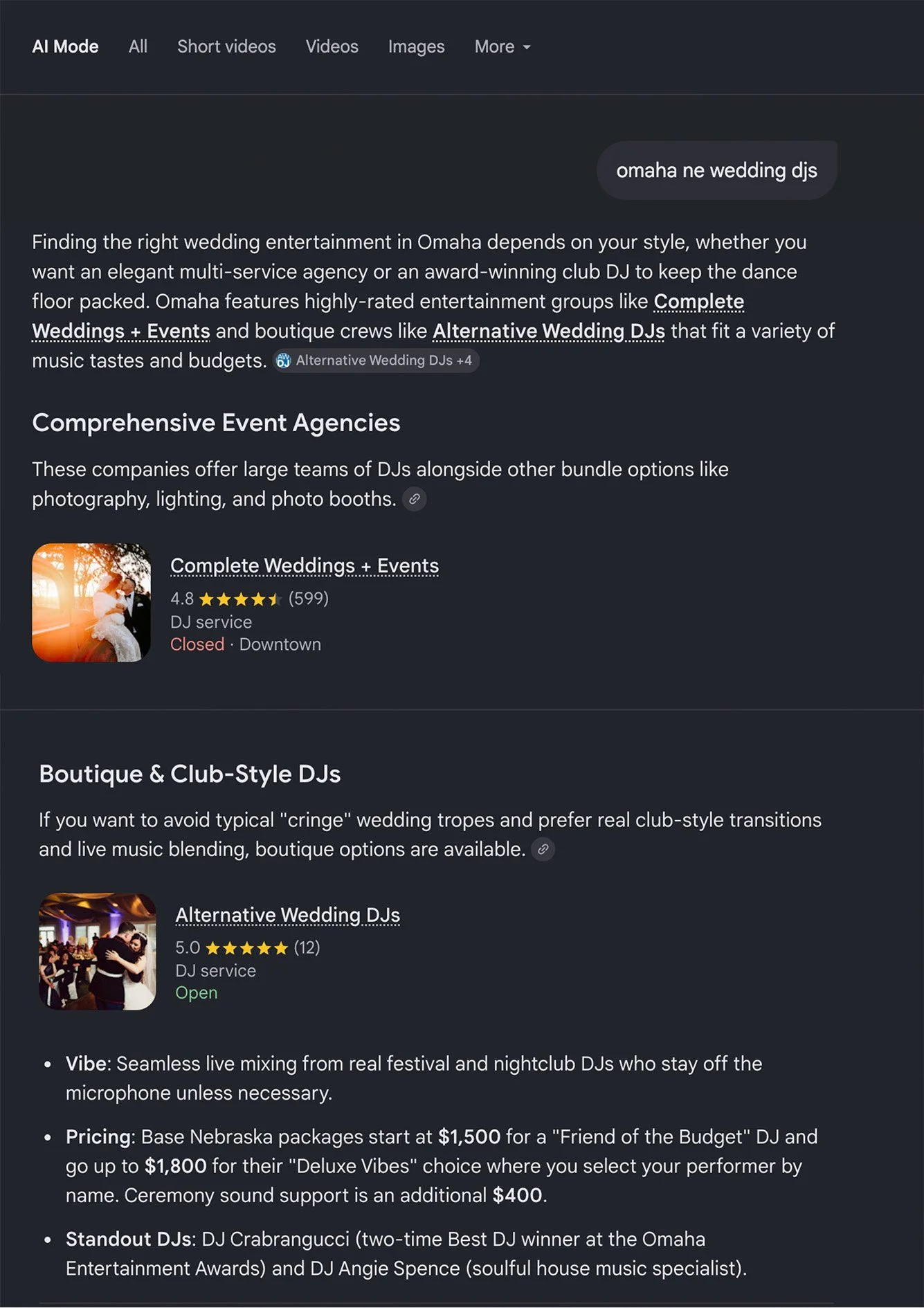
We now show up on page 1 of Google for our primary keywords (wedding DJ Omaha, alternative wedding DJ, Lincoln wedding DJ, and the rest of our priority terms across Nebraska and Wisconsin)
Now showing up as a cited source in ChatGPT, Gemini, and Perplexity for 'wedding DJ Omaha'-style queries (specific results coming soon, as there’s now tools to track that stuff)
Over 50 weddings booked this year as of April 2026, which puts us on track to more than double 2025 totals
It’s working.
While others are stuck, there’s an opportunity to get ahead.
Yes, search is changing. The web is shifting from a “click web,” where you had to click onto pages to find an answer, to a “zero-click web,” where people get the answer without ever seeing your website.
Most people will get stuck at this point with frustration, fear, or anger. Don’t do that.
Your perspective should be: One closed door opens another.
Yes, fewer people click. But the ones who do are 4 to 23x more likely to convert.
23x. Just think about that.
Ahrefs, an SEO leader, published their own analytics in June 2025 to back up that 23x number.
To use an analogy, that means your website is no longer a farmers market where people show up to casually walk their dog as their preferred Saturday outing. Now your website is the off-the-beaten-path specialty boutique store that when someone walks through the door, they’ve specifically sought you out and wanna buy something.
That means your website should adjust accordingly.
As I mentioned, a few of the AI tools have guides for exactly what to do, like that Google paper I mentioned.
Google’s guide cleared up a lot of what people have been guessing about for the last year.
I've updated this post to reflect what Google shared — including one thing I had wrong in my original version of this blog (insert fall-forward). More on that at the bottom.
The point is, the businesses jumping on this first are enjoying an unfair advantage. And you can, too. So let’s dive in …
SEO, AEO, GEO - What are these terms?
Quick definitions in case the acronyms are new.
SEO (Search Engine Optimisation) is what gets your website to rank on Google. This is what people have been doing for years. Old term.
New terms: AEO (Answer Engine Optimisation) and GEO (Generative Engine Optimisation) are what gets your website cited by AI tools like ChatGPT, Perplexity, Gemini, and Claude.
The consensus amongst the experts I’m watching seems to be that it all can be categorized under SEO. But I wanted to cover this quickly, as you see these acronyms thrown around.
Here are three on-page fixes that will help your website show up in AI searches.
1. Fix your headers
You know how there are different text sizes you can use on your website? H1, H2, H3, and paragraph text? They're not just design options. It's how Google and AI interpret what's on your page. If those aren't used right, your search and cite ranking suffers.
The format you want:
H1 is your page title. One per page. Put a real keyword in it. "Omaha wedding DJ," not "About Us."
H2s are your main sections. Microsoft's guide says they should function as "chapter titles" and gives a great example. Instead of a vague H2 like "Learn More," use "What Makes This Dishwasher Quieter Than Most Models?" Specific question-form headings get picked up by AI. Generic headings get skipped.
Paragraph text under each H2 should answer the question the heading implies in the first sentence. Specifics, numbers, real answers up top. This isn't a robot-feeding trick. It's just good writing. The newspaper guys called it the inverted pyramid 150 years ago: put the answer at the top, earn the reader's attention with depth below. AI tools reward this for the same reason humans do. You're not writing two paragraphs for two audiences. You're writing one piece of content that respects the reader's time, and AI happens to respect the same thing.
The trap most sites fall into: the H2 says one thing, the section underneath talks about something else. That's a double penalty. Google reads it as low-quality content. AI tools can't quote you confidently because they can't tell what the section is actually about.
Quick test: read just your H1 and H2s out loud, in order. Do they tell a clear story of what the page covers? If not, rewrite.
2. Add an FAQ to every important page
FAQs work for AI search for one reason: they answer real questions in the same conversational format people use when they ask AI tools. Couples don't type "wedding DJ pricing Omaha" into ChatGPT. They type "how much does a wedding DJ in Omaha cost?" If your page has that question and a real, useful answer below it, the AI has something clean to quote.
Important distinction here: this isn't "chunking your content for AI." Google specifically called that out as a tactic they don't reward. Breaking articles into tiny robotic fragments doesn't help. What does help is having genuine questions with genuine answers, written for actual humans, that happen to also match how people query AI tools. Same content, different mindset.
Microsoft's guide shows an example of the format that gets quoted word for word:
Q: How loud is the dishwasher?A: It operates at 42 dB, which is quieter than most dishwashers on the market.
Question, then a tight, factual, snippable answer.
What we did for AWDJ:
Pulled the 8 to 10 questions we get asked most. Pricing, what's included, how booking works, travel fees, music limits.
Wrote a tight 50-to-100-word answer for each. No fluff.
Formatted the question as an H3, the answer as paragraph text underneath. (We use Squarespace accordion blocks on most pages. More on that in a second.)
Dropped the FAQ block onto the homepage, the services page, and every market-specific landing page (Omaha, Lincoln, the Wisconsin pages).
One block, multiple placements.
A note on accordions, because I got this wrong in an earlier version of this post.
A lot of AEO content (mine included) said never to hide your FAQs in accordions because the crawler can't see them. That's mostly wrong. Squarespace, Showit, and Wix accordions all render the full content in the initial HTML. AI tools can read them. The text is in the page source from the moment the page loads.
There's some open debate about whether hidden-by-default content gets extracted as aggressively as always-visible content. Nobody outside the search teams at Google and Microsoft knows the exact weighting. But "the AI can't see it" is the wrong concern. It can.
Best way to test it yourself: ask ChatGPT or Perplexity a question your FAQ answers. If the answer comes back accurate and cites you, your accordions are doing their job. If it doesn't, consider switching that specific page to always-visible H3 + paragraph format as a test.
The questions to pick: the ones people email you about before they buy. The ones they ask on a discovery call in the first two minutes. Those are the questions AI is being asked too.
A note on "chunking"
You may have read advice that says you should break your content into bite-sized chunks for AI to extract. Google's official guide explicitly pushes back on this. Their search liaison Danny Sullivan said on a podcast: don't do it. Their systems can understand multi-topic pages just fine.
The reason this matters: when AEO advice told everyone to chop their content into tiny robot-friendly bits, what most people produced was worse content for humans. Shorter sentences. Less context. Less of a real voice. The kind of writing that reads like it was assembled by a content marketing AI for a content extraction AI to consume. Google sees this clearly. Don't do it.
What works instead: write for humans, but make sure your structure is clear. Specific question-style headings, real answers below them, a real voice throughout. That's what AI tools quote and what humans actually want to read.
One nuance worth adding (June 2026): Google got up on stage at its Search Central event in Milan and openly walked through how it "chunks" pages — chopping them into passages it can pull from. So the chunking happens. The point is the machine does it for you. Your job isn't to pre-chop your content into robotic bits. It's to write clean, self-contained sections so that when Google lifts one passage out, it still makes sense on its own. Clear heading, real answer underneath, no loose ends. Structure for the human and the chunk takes care of itself.
3. Write content that doesn't sound like every other website
If you deleted your content from the internet, would anyone miss it?
That’s how SEO expert Marie Haynes framed it in her review of Google’s first AI search guide.
Google calls it "non-commodity content." Something like, “10 tips for having the perfect wedding day” is commodity content. The old strategy told us to do that. That is was a way to show up in search results. But in the process, it bred mediocre and AI-slop content. Anyone could write it (or have AI write it). And because of that, there’s tons of content already like this.
The era of this strategy is officially over.
Instead, you want stuff like "How my last-minute decision as an event planner saved this wedding.” It's the actual creative work that only humans can do. AI can’t make it up. It’s your specific stories, experiences, and hard-earned insights you’ve gathered through years of doing your job. So do more of this kind of content.
What this looks like for a service business:
Write from real experience. Talk about specific clients, specific venues, specific moments. Generalities are commodity. Details, facts, and stories are not.
Have an opinion. "Why most wedding DJs play the same predictable set" is stronger than "How to Choose a Wedding DJ." The first one only you could write. The second one is on every wedding blog already.
Stop summarising what other people have written. Write what you've actually done. Your case studies, your screw-ups, your weird angle on the industry — that's what AI tools have nothing to compare against, so it's what they pull from.
Use your own data and metrics. Numbers from your business are non-commodity by definition. AI loves to quote your data and metrics, because it can’t invent that sort of thing.
And again, ask yourself: if you deleted this content later, would anyone miss it? This is the difference between a website that ranks short-term and a website that compounds.
What do the guides from ChatGPT, Perplexity, and Claude say?
Quick answer: Doing the work above covers most of it. None of them has published a content guide as detailed as Microsoft's or Google's. Here's what they've said in their own docs:
ChatGPT search runs on Bing's index for most queries, so Microsoft's guidance is the closest thing to an official ChatGPT playbook. You can track ChatGPT traffic by looking for utm_source=chatgpt.com in your analytics. And make sure you're not blocking the OAI-SearchBot crawler in your robots.txt.
Microsoft Copilot also runs on Bing. Microsoft offers a free AI Performance report inside Bing Webmaster Tools that shows you exactly which of your pages Copilot is citing and what questions it's answering with them. Set it up — it's free, and it's been the most detailed AI-citation tool going.
Update (June 2026): Google's catching up. It's rolling out its own AI performance report inside Search Console — started in the UK, now showing up in India and beyond. Might not be in your account yet, but go check. Between the two, you can finally see which of your pages AI is actually pulling from.
Perplexity has its own crawler (PerplexityBot) and uses Bing as one of its sources. It cares about freshness more than the other AI tools, so updating your pages regularly helps. Track Perplexity traffic by looking for perplexity.ai in your referrals.
Claude uses Brave Search, not Bing. It's a smaller search surface so it gets less attention, but broad SEO work helps you here too. No special optimisation needed.
The shared rule across all of them: write specific question-style headings, answer real questions plainly, let your voice come through, and don't try to game the system with weird formatting.
What about JSON-LD schema?
Summary: I used to think it was essential. Now I think it’s a nice-to-have, not a must-have.
Here’s my thinking …
Schema is hidden code on your page that tells Google what kind of business you are, what services you offer, what questions you answer. It still has some value — it can help with rich results like featured snippets and knowledge panels.
One correction from an earlier version of this post: those FAQ drop-down accordions that schema used to earn you in search results? Gone. Google killed FAQ rich results for most sites back in 2023, and as of June 2026 it's removed FAQ schema reporting from Search Console too. So don't add FAQ markup expecting those boxes to show up. They're not coming back.
Google's May 2026 guide explicitly says schema is NOT required for AI search. The AI tools can understand your page without it. So if you're triaging where to spend your week, schema is the third or fourth priority, not the first.
BUT Google's "not required" applies specifically to Google's AI features. ChatGPT, Perplexity, and Bing Copilot each have their own retrieval behaviours, and structured data doesn't hurt with any of them. So if you're going to do the work, it pays off across the board. Just don't expect it to be the silver bullet some AEO posts make it out to be.
If you want to add it anyway — and you probably should — the easy way is to ask your AI tool to look at the finished page and generate the JSON-LD for you. Paste it into your site's code injection area. The schema types worth adding for a service business: LocalBusiness, Service, and Review. You can still add FAQPage if you want — it won't hurt, and some AI tools may read it — just don't expect it to earn you anything visible in Google's results anymore.
I touched on this in my post on building the guide your city uses, which lays out the same moves applied to a long-form directory post.
Want me to look at your website?
Let’s be honest. This whole SEO world is kind of confusing. So if you need help, I’ll do a free SEO/AEO audit of your site.
I'll go through your headers, your FAQs, your schema, your Google Business Profile, your overall AI-citation readiness. Then a 30-minute call to walk you through what I found, what to fix first, and what to ignore.
Now go fix your headers.